Settings
XPress settings live in three places, each answering a different question.
| What it is | Who it affects | |
|---|---|---|
| Export templates | Named, saved configurations you build once and reuse | Everyone on the site |
| A template’s labels | Which pages it suggests itself for | Anyone one-click exporting such a page |
| A space’s default template | Which template one-click exports in that space use | Everyone exporting from that space |
| Per-export adjustments | Changes you make to a single export | Only that export |
Export templates
Section titled “Export templates”A template holds a complete export configuration - format, paper size, orientation, margins, cover page, contents page, header, footer, page numbers, watermark and file name - under a name you choose. Templates are site-wide, so one means the same thing in every space.
Build and edit them in the visual designer: press Templates at the top of the XPress page, in a space or under Apps. Anyone can create a template; only its creator or a site admin can change or delete it, and lock the settings everyone who exports with it must keep. Full detail in Export Templates.
A default template per space
Section titled “A default template per space”Each space can nominate one template as its default. That default drives the one-click exports - the Export (XPress) action in a page’s byline and in its ··· menu - so everything filed under that space comes out consistent.
Only a space admin or a site admin can set it. The default decides the cover, header, footer and watermark on every one-click export in the space, so it is not something any member can change on everyone else’s behalf. If you are not an admin, you simply will not see the option.
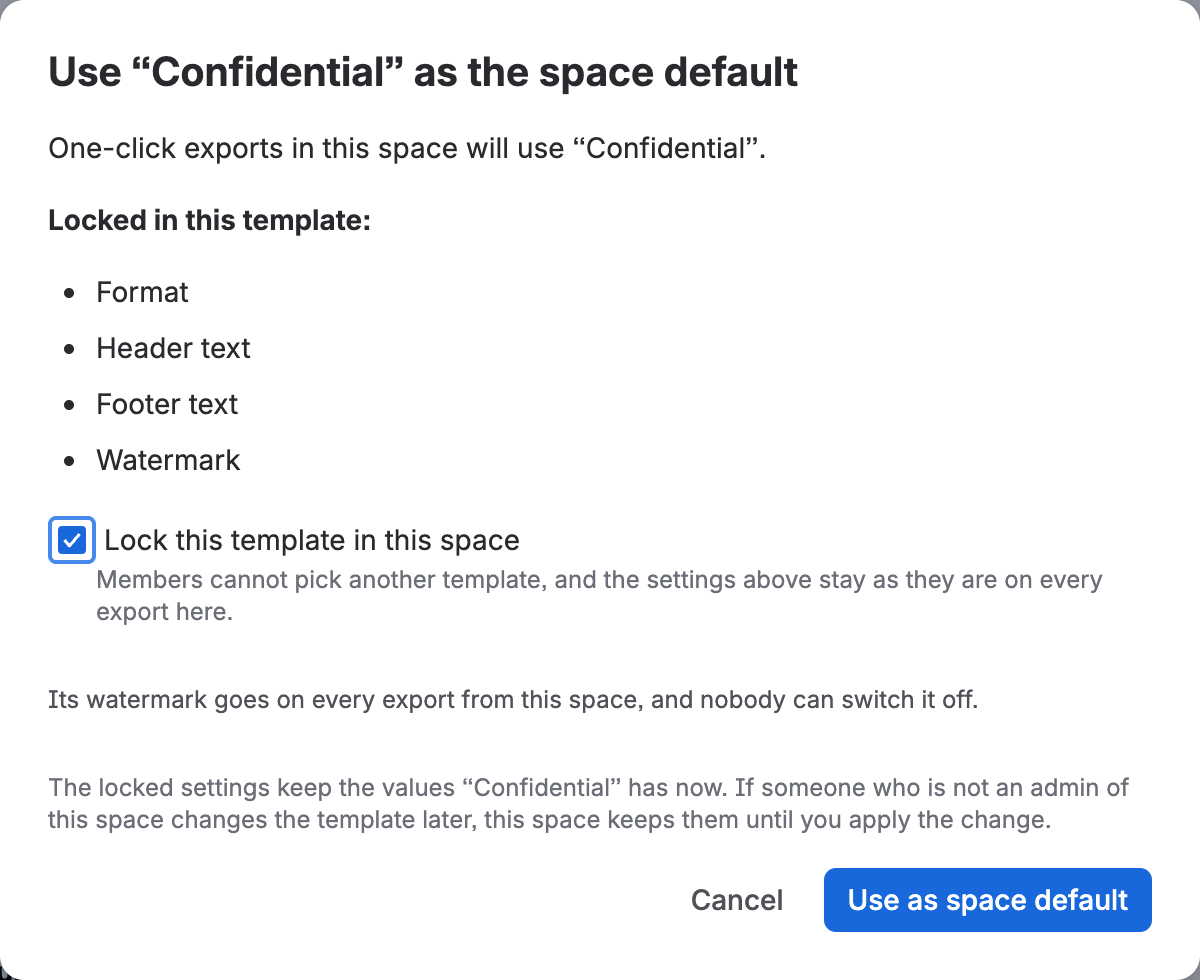
A watermark in the default goes on everything. When an admin chooses a default template with a watermark, every export from the space carries it: the one-click exports, the XPress page, and exports from the space’s XPress panel, whichever template is picked there. The watermark switch shows it as required, so nobody can leave it off their own copy.
Lock the template in the space. A template can lock settings, such as the header or the file name, and they hold wherever it is used, as its owner sets them. Without the space’s lock, though, people can pick another template in the space’s XPress settings. When an admin ticks Lock this template in this space, the default becomes the only template for the space: the picker stays on it, marked Locked in this space, and the settings it locks come out the same on every export from the space, from the one-click exports, the XPress page and the space’s XPress panel alike. They keep the values the template has when the admin locks it, until a space or site admin changes them. Everything the template leaves unlocked stays each person’s to adjust.
Only a space admin or a site admin decides what the space requires. When one of them edits the template, the space takes the change to its watermark and, if the space locks the template, to its locked settings too, including which settings are locked. When the template’s owner edits them, the space keeps what its admin chose, and the space’s XPress settings show the space admin what changed, with an option under Manage to apply it. A change that would remove the space’s watermark is never offered: to stop marking the space’s documents, an admin picks a different default.
A required watermark needs letters or numbers of its own: one made only of {title} or
{space} is not required, and the designer says so as you type. While a watermark is required,
page margins are held to at most 40 mm a side, so the watermark always has room to print whole.
A PDF you made before the space required its watermark is not offered as the page’s current
one: XPress makes a marked copy instead.
To choose it, open XPress in the space and press Space settings at the top (only space and site admins see it). Pick the template and press Use as space default under Manage. The window lists what the template locks: tick Lock this template in this space if members must not pick another, and confirm. From then on the picker opens on it for everyone, marked Space default. To lock or unlock it later, an admin opens Locked in this space or Not locked in this space under Manage; to choose another default for a space that locks its template, untick the lock there first. If the template a space locks is deleted, its locked settings and its watermark still hold on every export from the space. The picker opens again, and admins see Locked template deleted under Manage until they choose another default.
Without a default, one-click exports use a template labelled for the page, otherwise the template you last picked and exported with, and otherwise Simple document, the plainest starter template, so even the very first document already looks finished. The XPress page in a space starts the same way: the space’s default, else the template you used last, else Simple document.
Per-export adjustments
Section titled “Per-export adjustments”You do not need to edit a template to change a single export. The paper, the format, the cover, the contents and the watermark switch right in Will export. For everything else, choose More options, then Adjust for this export, change what you need, and export from that window. XPress flags the settings panel while they differ from the template, with Reset to template to put them back, and leaves the template untouched. A setting the template or the space locks is the exception: it shows its value with a padlock beside it and cannot be changed, and a note above the settings names what is locked.

Exporting one page from the XPress page under Apps? Pick it, and the Will export panel offers the four adjustments a single page needs most - paper size, cover page, contents page and watermark - again for that export only, unless a lock holds them. See One-Click Export.
Nobody inherits a colleague’s one-off change: an adjustment applies to the export you make it for and is not remembered. If a configuration matters, save it as a template.
What each setting does
Section titled “What each setting does”| Section | Controls | Documented in |
|---|---|---|
| Format | PDF or HTML; Markdown per export | Markdown Export |
| Layout | Paper size, orientation | Page Layout |
| Margins | Top / Right / Bottom / Left in mm, optionally mirrored for binding | Page Layout |
| File name | The name the exported file is saved under, placeholders included. Left empty, the file takes the page’s title | Headers & Footers |
| Page styles | Heading 1 to 3, body text, tables, panels and code blocks, each left as in Confluence until you set it, and one or two columns | Page Layout |
| Cover page | Toggle + one of four designs, title, subtitle, up to three lines, the export date, and a logo - your site’s or a URL | Export Templates |
| Bare cover | Toggle - no header, footer, logo or page number on the cover sheet | Headers & Footers |
| Contents page | Toggle + how deep it lists: pages, or pages and their headings, with page numbers beside each entry in a PDF | Page Layout |
| Numbered headings | Toggle - numbers every section and the headings inside it | Page Layout |
| Numbered pictures | Toggle - captions each attached picture as Figure 1, 2, 3 | Page Layout |
| Header | Words on the left, in the centre and on the right of the top margin, placeholders included (PDF only) | Headers & Footers |
| Footer | The same three places along the bottom margin (PDF only) | Headers & Footers |
| Header or footer logo | Your site’s logo or its compact mark, in any of the six places. Set in the template (PDF only) | Headers & Footers |
| Page Numbers | Toggle + position (top or bottom, left, center or right) and style (1, i or I) (PDF only) | Headers & Footers |
| Watermark | Toggle + text, position, opacity, rotation, size | Export Templates |
| Title sizes | Size, weight and line height of the cover title, page titles and contents heading | Page Layout |
What is not configurable
Section titled “What is not configurable”- An image in the header or footer other than your site’s logo. A logo you host at a web address goes on the cover page.
- The watermark’s colour - its text, position, size, angle and opacity are yours; the colour itself is fixed.
- Different settings for different sections of one bulk export.
- Different words on odd and even pages. With mirrored margins the header and footer trade sides on every other page, but they say the same thing on each.
- Page numbers that start again after the cover. The count includes the cover and the contents page.
If any of these would meaningfully change your workflow, tell us at support@bytera.tech.
What is stored
Section titled “What is stored”- Templates, shared across the site, kept until someone deletes them. A site can hold far more than any team we have met has wanted; if you ever meet the ceiling, tell us and we will raise it.
- Each space’s default template, and when the space locks it, the values it locked.
- Your own favourite templates and the template you used last, kept for you alone. See Export Templates.
- Your brand - logo, colours and typefaces, kept until an admin changes them. See Your Brand.
- Export history - the last 20 exports per space, each kept for 30 days. See Export History.
- Export Templates - build one in the designer.
- Troubleshooting & FAQ - common questions about exporting.