Content Health Score
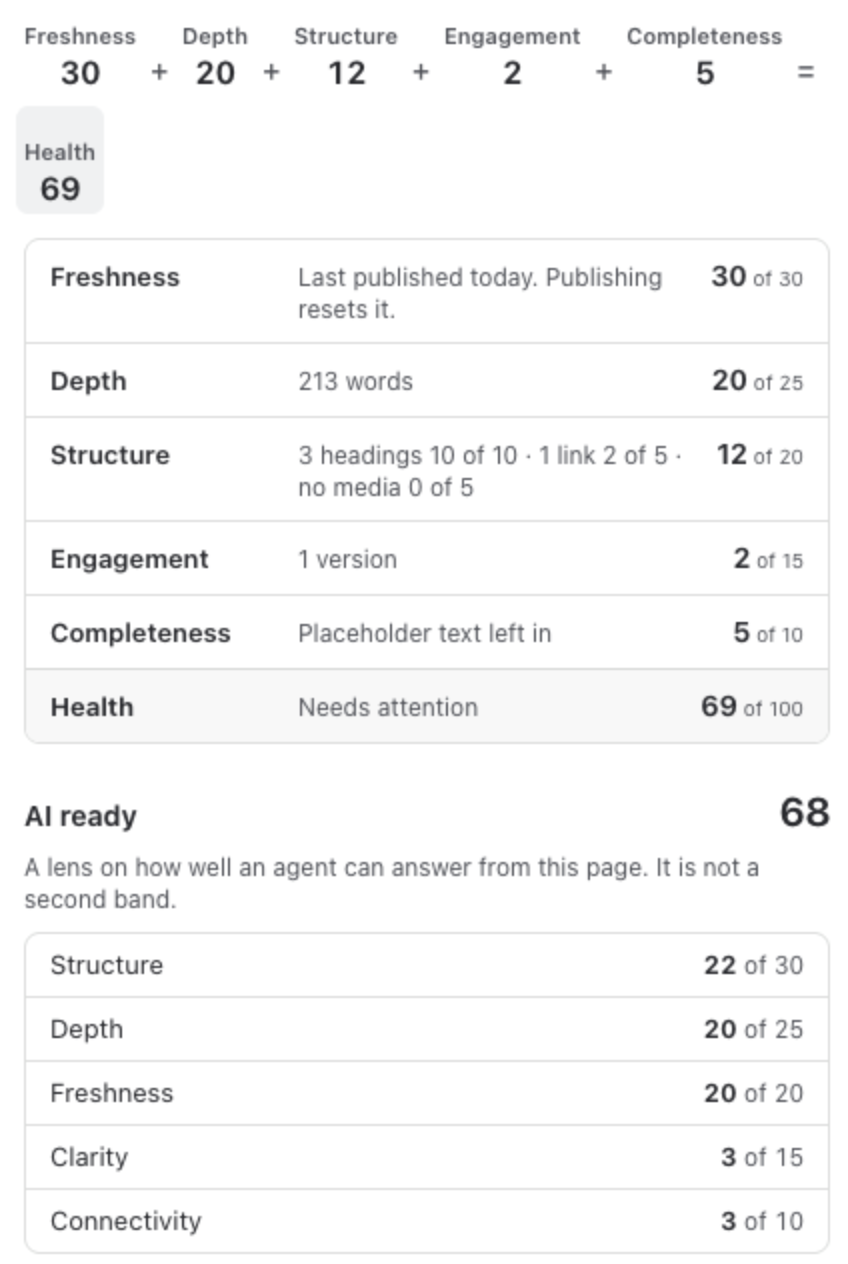
The Health score says how well a page is doing as a piece of knowledge. It runs from 0 to 100 and is the sum of five parts. Every part is shown, with what it earned and why, in Page vitals, so nobody has to guess where a number comes from.
The bands
Section titled “The bands”| Band | Score |
|---|---|
| Healthy | 70 and above |
| Needs attention | 40 to 69 |
| Critical | below 40 |
Healthy starts at 70, and a page does not need every point to get there. Once a page will be Healthy after its next publish and no Must fix is open, the coach stops proposing steps.
How the score is made
Section titled “How the score is made”| Part | Points | How it is earned |
|---|---|---|
| Freshness | up to 30 | Published in the last 30 days: 30. In the last 90 days: 22. 180 days: 15. A year: 8. Older: 0. |
| Depth | up to 25 | 500 words or more: 25. 200: 20. 100: 15. 50: 8. 10: 3. |
| Structure | up to 20 | Headings: 3 or more 10, 1 or 2 give 5. Links: 3 or more 5, 1 or 2 give 2. Images and other media: 2 or more 5, 1 gives 3. |
| Engagement | up to 15 | Versions of the page: more than 10, 15. More than 5, 11. More than 2, 7. Otherwise 2. |
| Completeness | up to 10 | A real title, no placeholder text and 50 words or more: 10. A real title and 10 words or more: 5. |
| Links that do not open | down to minus 15 | Minus 5 for each, at most minus 15. |
Freshness and Engagement change only when the page is published, so the coach never asks you to do them. It shows them as changes when you publish.
Placeholder text is text such as TODO, TBD, placeholder, coming soon or lorem ipsum left in the page. The coach quotes it so you can find it.
Links that do not open are links to other Confluence pages that did not open for you when Pulse checked them as you: a page in the trash, a page that was deleted for good, or a page you are not allowed to see. Each person’s score counts the links that person checked. See Links that do not open.
Where you see it
Section titled “Where you see it”- Page Health under every page title.
- The line in the editor, as the score after you publish.
- Page vitals, part by part.
- For you, the Home section, the space report and Site, on every row.
With a content policy
Section titled “With a content policy”A Confluence admin can score the site with a content policy instead: seven rules with weights the admin sets, and a page’s score is the share of the total weight it earns, shown as a percentage. The bands stay at 70 and 40. See Content policies.
What the score is not
Section titled “What the score is not”- It does not judge the writing. Pulse counts structure, it does not read for meaning.
- It cannot tell whether the content is right. That is what Still correct and the review date are for: see Page vitals.
- It is not a score of a person. Lists show what a page needs, never who let it slip.
When the score changes
Section titled “When the score changes”| When | What happens |
|---|---|
| While you edit | The line scores your draft as you type, as the score after you publish. |
| On every publish | Confluence tells Pulse about the change, and the page is scored again. |
| Every week | Pulse checks every page again, so freshness keeps up with time. |
- AI-Ready Score: the companion score for AI agents.
- Content policies: score with your own rules.